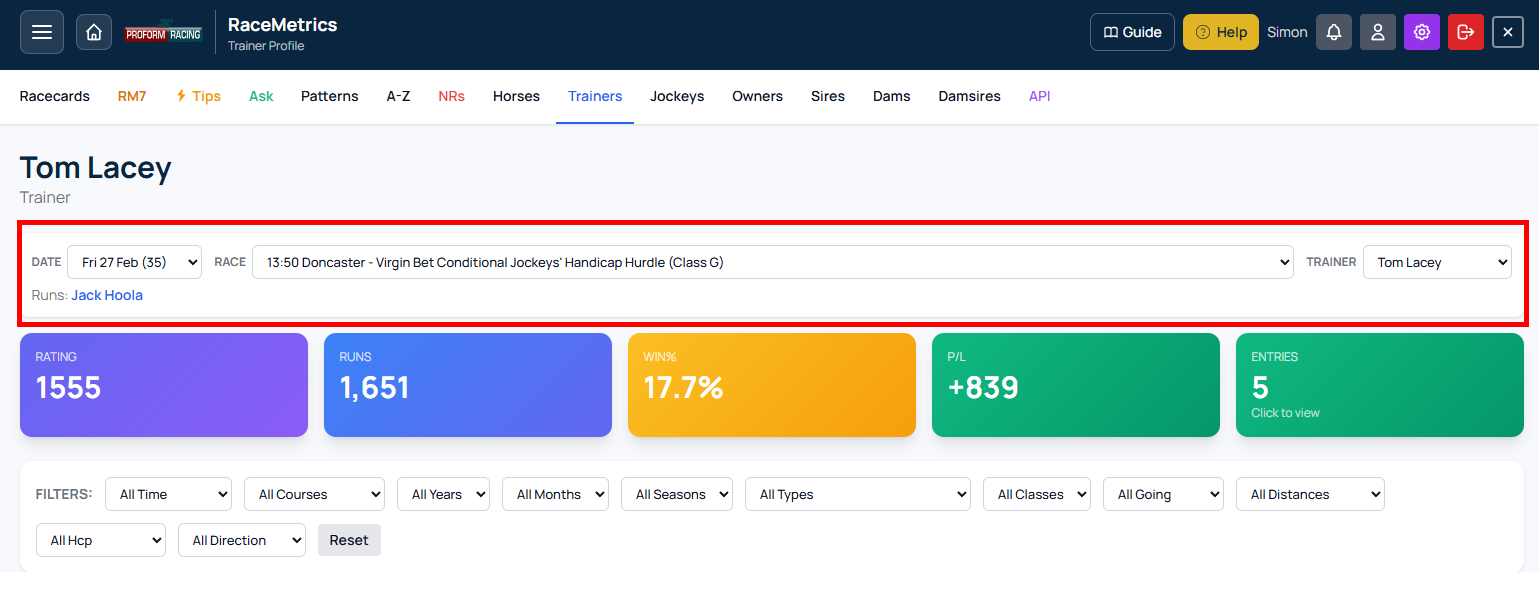
Race Context Navigator: Browse Racecard Participants Without Leaving the Profile
The Race Context Navigator is a navigation tool that appears when you open a profile directly from a racecard. Instead of jumping back and forth between the race and individual profiles, you can browse every trainer, jockey, sire, owner, or dam in that race from a single page.
How to Access It
Click any name link on a racecard—a trainer, jockey, sire, dam, damsire, or owner—and their profile loads with the Navigator active at the top. The feature only appears when you arrive from a racecard; direct profile links won't show it.
Navigation Controls
The Navigator has three dropdown menus:
- Date: Switch between upcoming race dates to browse different days.
- Race: View all races for your selected date, with times and courses listed. Select any race to load its participants.
- Participant: Switch instantly between trainers, jockeys, or other connections running in the selected race.
Viewing Horse Runs
Below the dropdowns, a "Runs:" label displays which horse or horses the selected participant has in that race. Horse names are clickable links to their full profile pages.
Smart Filter Carry-Over
When you switch between participants, RaceMetrics preserves your active filters—course, going, class, time period, and more—plus your selected tab. This means you can compare different trainers or jockeys under identical conditions without manually resetting filters each time.
Key Notes
When you change the date, all races for that day load, with the first race auto-selected. Bear in mind that each participant switch counts as a profile view toward your daily limit.
The Race Context Navigator saves time when you're researching a specific race and need to compare multiple connections quickly.
