Form Expert: Analyse Every Angle of Your Runners
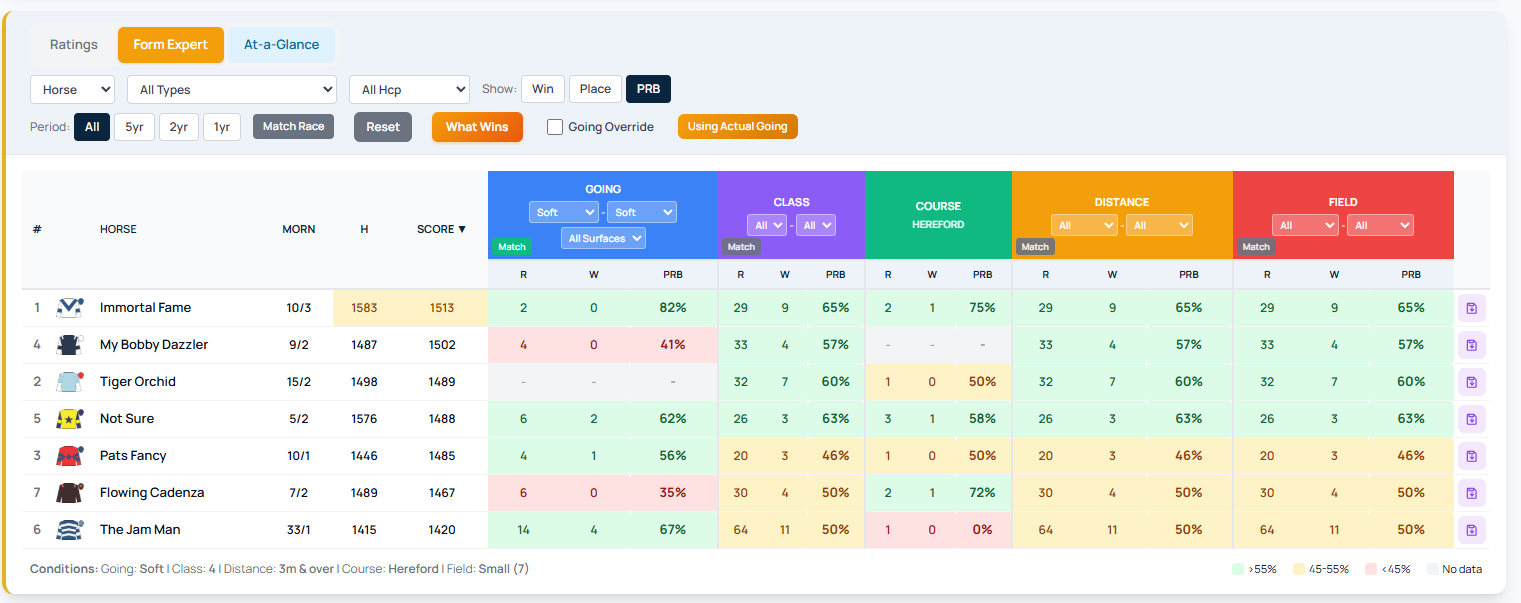
Form Expert is the RaceMetrics tool for dissecting historical performance data. Instead of looking at a horse in isolation, you can examine how trainers, jockeys, sires, dams, and owners perform under specific race conditions. This multi-angle approach reveals patterns that single-horse analysis misses.
Getting Started
Open any racecard from the Racecards tab or hamburger menu. In the Runners section, click the Form Expert button to switch from the standard Ratings view. You'll see the same runners, but with customisable performance breakdowns instead of single ratings.
Seven Participant Types
Use the participant dropdown to switch between analysis views:
- Horse — The runner's own historical form
- Trainer — How the trainer performs across different conditions
- Jockey — Jockey-specific performance breakdown
- Sire — How the sire's offspring have performed
- Dam — Performance of the dam's other offspring
- Damsire — Results from the dam's sire's descendants
- Owner — The owner's runners overall performance
Filter By Conditions
The control bar lets you narrow results by race type (Flat, Jumps, or specific surfaces), handicap status, and time period (5-year, 2-year, or 1-year windows).
Choose your show mode: Win (victories only), Place (1st–4th finishes), or PRB (Percentage of Rivals Beaten, showing average field dominance).
Match Race: Instant Context
The Match Race button automatically filters all columns to match the current race conditions — going, class, distance, field size, race type, and handicap status. Activate it once and it stays active as you navigate between races, speeding up form analysis across a full meeting card.
